Pages

Google Ads

Tuesday, March 11, 2014

Mondrian Architecture - Storage and aggregation strategies

Storage and aggregation strategies 

OLAP Servers are generally categorized according to how they store their data:
  • A MOLAP (multidimensional OLAP) server stores all of its data on disk in structures optimized for multidimensional access. Typically, data is stored in dense arrays, requiring only 4 or 8 bytes per cell value.
  • A ROLAP (relational OLAP) server stores its data in a relational database. Each row in a fact table has a column for each dimension and measure.
Three kinds of data need to be stored: fact table data (the transactional records), aggregates, and dimensions.

MOLAP databases store fact data in multidimensional format, but if there are more than a few dimensions, this data will be sparse, and the multidimensional format does not perform well. A HOLAP (hybrid OLAP) system solves this problem by leaving the most granular data in the relational database, but stores aggregates in multidimensional format.

Pre-computed aggregates are necessary for large data sets, otherwise certain queries could not be answered without reading the entire contents of the fact table. MOLAP aggregates are often an image of the in-memory data structure, broken up into pages and stored on disk. ROLAP aggregates are stored in tables. In some ROLAP systems these are explicitly managed by the OLAP server; in other systems, the tables are declared as materialized views, and they are implicitly used when the OLAP server issues a query with the right combination of columns in the group by clause.

The final component of the aggregation strategy is the cache. The cache holds pre-computed aggregations in memory so subsequent queries can access cell values without going to disk. If the cache holds the required data set at a lower level of aggregation, it can compute the required data set by rolling up.

The cache is arguably the most important part of the aggregation strategy because it is adaptive. It is difficult to choose a set of aggregations to pre-compute which speed up the system without using huge amounts of disk, particularly those with a high dimensionality or if the users are submitting unpredictable queries. And in a system where data is changing in real-time, it is impractical to maintain pre-computed aggregates. A reasonably sized cache can allow a system to perform adequately in the face of unpredictable queries, with few or no pre-computed aggregates.

Mondrian's aggregation strategy is as follows:
  • Fact data is stored in the RDBMS. Why develop a storage manager when the RDBMS already has one?
  • Read aggregate data into the cache by submitting group by queries. Again, why develop an aggregator when the RDBMS has one?
  • If the RDBMS supports materialized views, and the database administrator chooses to create materialized views for particular aggregations, then Mondrian will use them implicitly. Ideally, Mondrian's aggregation manager should be aware that these materialized views exist and that those particular aggregations are cheap to compute. It should even offer tuning suggestings to the database administrator.
The general idea is to delegate unto the database what is the database's. This places additional burden on the database, but once those features are added to the database, all clients of the database will benefit from them. Multidimensional storage would reduce I/O and result in faster operation in some circumstances, but I don't think it warrants the complexity at this stage.

A wonderful side-effect is that because Mondrian requires no storage of its own, it can be installed by adding a JAR file to the class path and be up and running immediately. Because there are no redundant data sets to manage, the data-loading process is easier, and Mondrian is ideally suited to do OLAP on data sets which change in real time

Source:

Mondrian Architecture - Layers of a Mondrian system

Layers of a Mondrian system

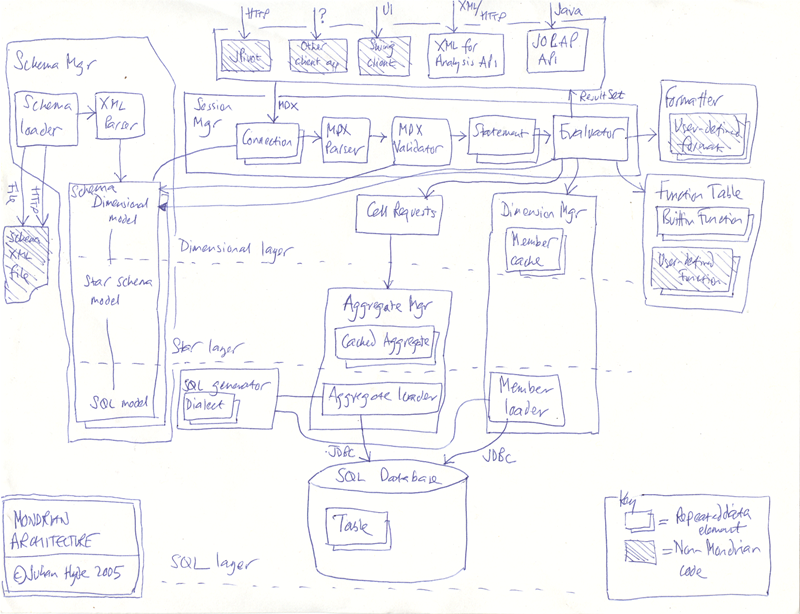
A Mondrian OLAP System consists of four layers; working from the eyes of the end-user to the bowels of the data center, these are as follows: the presentation layer, the dimensional layer, the star layer, and the storage layer. (See figure 1.)

The presentation layer determines what the end-user sees on his or her monitor, and how he or she can interact to ask new questions. There are many ways to present multidimensional datasets, including pivot tables (an interactive version of the table shown above), pie, line and bar charts, and advanced visualization tools such as clickable maps and dynamic graphics. These might be written in Swing or JSP, charts rendered in JPEG or GIF format, or transmitted to a remote application via XML. What all of these forms of presentation have in common is the multidimensional 'grammar' of dimensions, measures and cells in which the presentation layer asks the question, and the OLAP server returns the answer.

The second layer is the dimensional layer. The dimensional layer parses, validates and executes MDX queries. A query is evaluted in multiple phases. The axes are computed first, then the values of the cells within the axes. For efficiency, the dimensional layer sends cell-requests to the aggregation layer in batches. A query transformer allows the application to manipulate existing queries, rather than building an MDX statement from scratch for each request. And metadata describes the the dimensional model, and how it maps onto the relational model.

The third layer is the star layer, and is responsible for maintaining an aggregate cache. An aggregation is a set of measure values ('cells') in memory, qualified by a set of dimension column values. The dimensional layer sends requests for sets of cells. If the requested cells are not in the cache, or derivable by rolling up an aggregation in the cache, the aggregation manager sends a request to the storage layer.

The storage layer is an RDBMS. It is responsible for providing aggregated cell data, and members from dimension tables. I describe below why I decided to use the features of the RDBMS rather than developing a storage system optimized for multidimensional data.

These components can all exist on the same machine, or can be distributed between machines. Layers 2 and 3, which comprise the Mondrian server, must be on the same machine. The storage layer could be on another machine, accessed via remote JDBC connection. In a multi-user system, the presentation layer would exist on each end-user's machine (except in the case of JSP pages generated on the server).

Mondrian architecture
Zoom
Mondrian architecture (hand-drawn)
Zoom
Source:
http://mondrian.pentaho.com/documentation/architecture.php

OpenNMS is the world’s first enterprise grade network management application platform (Open Source)

OpenNMS is an award winning network management application platform with a long track 
record of providing solutions for enterprises and carriers.

OpenNMS is the world’s first enterprise grade network management application platform developed under the open source model.

Well, what does that mean?

World’s First: The OpenNMS Project was started in July of 1999 and registered on SourceForge in March of 2000. It has years of experience on the alternatives.

Enterprise Grade: It was designed from “day one” to monitor tens of thousands to ultimately unlimited devices with a single instance. It brings the power, scalability and flexibility that enterprises and carriers demand.

Application Platform: While OpenNMS is useful “out of the box,”it is designed to be highly customizable to create an unique and integrated management solution.

Open Source: OpenNMS is 100% Free and Open Source software, with no license fees, software subscriptions or special “enterprise” versions.

Link:
http://www.opennms.org/about/

http://pt.wikipedia.org/wiki/Simple_Network_Management_Protocol

Como gerar uma senha usando o encr.sh do PDI

Pessoal,

Para gerar uma senha usando o encr.sh do PDI você precisa rodar o caminho abaixo:

./encr.sh -kettle sua_senha

Resultado:

MacBook-Air-de-Caio:data-integration caiomsouza$ ./encr.sh -kettle sua_senha
/Applications/Pentaho/pdi-ce-5.0.1-stable/data-integration
Encrypted 2be98afc86aa7f297be189163db9ca7db

PDI 5.0.1 Error: Oracle / PostgreSQL / MySQL date / timestamp problem using "Dimension lookup/update"

Solution:

 DB Connection properties->Advanced->Uncheck "Supports the timestamp datatype" option.


Log error:
Timestamp : There was a data type error: the data type of java.util.Date
 
 Problem:

 This is a reproducible issue tested in the following conditions:

 OS: Mac OS X Mavericks
 MySQL: 5.5.29
 PDI: 5.0.1

 The Dimension Lookup/Update Step fails when trying to update a row. It will work fine on initial load and if there are no changes found in the target dimension table. As soon as there is any update, an error is thrown with the following text:

 Caused by: java.lang.RuntimeException: date_from Timestamp : There was a data type error: the data type of java.util.Date object [Mon Jan 01 00:00:00 EST 1900] does not correspond to value meta [Timestamp]

 Sample transformation attached

 Solution:

 Found the fix for this problem (thanks mainly to kgdeck on the forums):

 I had to go under the DB Connection properties->Advanced->Uncheck "Supports the timestamp datatype" option. All fixed.

 That being said, I'm leaving this issue open to essentially ask the question of why that was enabled by default. I don't know much about other MySQL versions or if this is a global option for all DB connection types but in my case it should have been switched off by default. At the very least, I think it might be worth noting in the Dimension Lookup/Update step docs so that others understand why they get this error. Just my two cents..

Links:

 http://forums.pentaho.com/showthread.php?156107-Oracle-date-timestamp-problem-using-quot-Dimension-lookup-update-quot

 Dimension Lookup/Update Step Fails with MySQL
 http://jira.pentaho.com/browse/PDI-11353?page=com.atlassian.jira.plugin.system.issuetabpanels:all-tabpanel

Saturday, February 22, 2014

Sort emails by filesize gmail

You can now actually run a search for attachments based on size!  Approved operators:
  • size:5m - Find emails with attachments of 5M
  • larger:5m - Find e-mails with attachments larger than 5M
Suggested query: larger:5m older_than:2y
^ Will find all e-mails larger than 5MB and older than 2 years.

Creating S.M.A.R.T. Goals


Specific
Measurable
Attainable
Realistic
Timely

Specific: A specific goal has a much greater chance of being accomplished than a general goal. To set a specific goal you must answer the six “W” questions:
*Who:      Who is involved?
*What:     What do I want to accomplish?
*Where:    Identify a location.
*When:     Establish a time frame.
*Which:    Identify requirements and constraints.
*Why:      Specific reasons, purpose or benefits of accomplishing the goal.
EXAMPLE:  A general goal would be, “Get in shape.” But a specific goal would say, “Join a health club and workout 3 days a week.”

Measurable - Establish concrete criteria for measuring progress toward the attainment of each goal you set.
When you measure your progress, you stay on track, reach your target dates, and experience the exhilaration of achievement that spurs you on to continued effort required to reach your goal.
To determine if your goal is measurable, ask questions such as……
How much? How many?
How will I know when it is accomplished?


Attainable – When you identify goals that are most important to you, you begin to figure out ways you can make them come true. You develop the attitudes, abilities, skills, and financial capacity to reach them. You begin seeing previously overlooked opportunities to bring yourself closer to the achievement of your goals.
You can attain most any goal you set when you plan your steps wisely and establish a time frame that allows you to carry out those steps. Goals that may have seemed far away and out of reach eventually move closer and become attainable, not because your goals shrink, but because you grow and expand to match them. When you list your goals you build your self-image. You see yourself as worthy of these goals, and develop the traits and personality that allow you to possess them.

Realistic- To be realistic, a goal must represent an objective toward which you are both willing and able to work. A goal can be both high and realistic; you are the only one who can decide just how high your goal should be. But be sure that every goal represents substantial progress.
A high goal is frequently easier to reach than a low one because a low goal exerts low motivational force. Some of the hardest jobs you ever accomplished actually seem easy simply because they were a labor of love.

Timely – A goal should be grounded within a time frame. With no time frame tied to it there’s no sense of urgency. If you want to lose 10 lbs, when do you want to lose it by? “Someday” won’t work. But if you anchor it within a timeframe, “by May 1st”, then you’ve set your unconscious mind into motion to begin working on the goal.
Your goal is probably realistic if you truly believe that it can be accomplished. Additional ways to know if your goal is realistic is to determine if you have accomplished anything similar in the past or ask yourself what conditions would have to exist to accomplish this goal.
T can also stand for Tangible – A goal is tangible when you can experience it with one of the senses, that is, taste, touch, smell, sight or hearing.
When your goal is tangible you have a better chance of making it specific and measurable and thus attainable.

Please also see Goal Setting -Powerful Written Goals In 7 Easy Steps!

http://topachievement.com/smart.html

As diferenças de uma bicicleta dobrável

showmystreet.com - Just amazing!!!

Hi folks,

You need to visit this amazing website.

http://showmystreet.com/

You will love it.

Amazing!!!

P.S. Thanks Dad, for showing me this website.

Thursday, February 20, 2014

Monitorando memória usada em servidor Linux e outras coisas

Pessoal,

Seu servidor Linux está lento?

Execute:

ps aux | sort -k 4 -r | head -n 2

Exemplo real:

[ec2-user@it4biz /]$ ps aux | sort -k 4 -r | head -n 2
USER       PID %CPU %MEM    VSZ   RSS TTY      STAT START   TIME COMMAND
root     18562  4.0 68.7 2642072 1166888 ?     Sl   12:35  23:22 /usr/lib/java ...

Outros comandos interessantes:

free -m
free -t -m
vmstat
vmstat 5
ps aux